

Notifications
When someone does something that concerns you in a project, Blupinta tells you: always in the bell (at the top of the projects page, and in the editor beside your name), and by email as you choose in the settings.
What you are told
Section titled “What you are told”- Mentions: Tom Fisher mentioned you in Example flat, with the comment’s first words (Comments).
- Replies in a conversation you opened: Anna Clarke replied to your conversation in Example flat.
- Conversations resolved or reopened, when you wrote in them: Anna Clarke resolved a conversation in Example flat. Whoever did it isn’t told.
- Versions: Anna Clarke created v3 of Example flat, a version created or one restored, told to everyone else in the project (History and versions).
- Your invitations answered: Tom Fisher accepted your invitation to Example flat, or declined it (Inviting people).
- Your role: Anna Clarke made you a viewer in Example flat; Anna Clarke handed Example flat to you: you own it now.
- Being removed from a project: Anna Clarke removed you from Example flat.
Invitations to you wait in the bell too, until you answer them.
The bell
Section titled “The bell”The bell is at the top of the projects page and, in the editor, at the bottom of the left panel beside your name. The number on it counts the invitations waiting and the notifications you haven’t read. A click opens its panel, the same in both places.
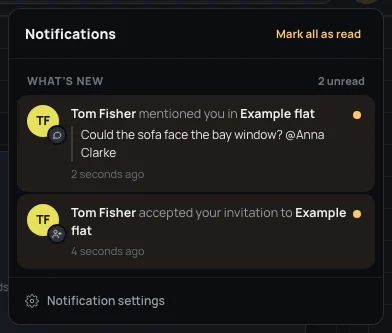
- Invitations, first, when there are some: Accept there, or Decline… to look at it before answering (Inviting people).
- What’s new: the latest notifications, newest first, with how many are unread. Each shows who did it, with a small sign of what they did on their face, and how long ago.
- An unread one is tinted, with a dot on the right: the dot (Mark as read) reads it without opening it.
- A click on one opens the project where it happened (a conversation opens on its pin) and marks that one as read. One about a project you were removed from opens nothing: You are no longer in it.
- Mark all as read, at the top, while something is unread.
- Notification settings, at the bottom, opens what reaches you by email.
The bell follows what happens while it is open: something new arrives in it without reloading the page, and what you read on one device is read on the others. With nothing to tell, it says Nothing new.
By email
Section titled “By email”For each kind you choose At once, Summary or Never, in Settings → Notifications (Your settings). Until you choose: invitations, mentions and sharing at once, conversations in the summary, versions never. Invitations and mentions can’t wait: at once or never.
The summary arrives every morning at 8, one email with what happened since the day before, as the bell says it. What you already read in the bell isn’t in it, and nothing arrives twice. Every email ends with a link to choose what reaches you.